Monday, October 12, 2026

Metabo Miter Saw - Blade Changing and Removal


I recently purchased a 10" Metabo C10FCG2 miter saw despite some negative reviews and comments on Amazon, Reddit and YouTube about how difficult the blades are to change the first time.  Those comments aren't wrong but I want to share how easy this was for me to fix.  Hopefully this solution works for you as well. 

For a homeowner this looks like an ideal and affordable alternative to 10" or 12" models from DeWalt and even from Skil. A major appeal of this model for me, being more of an engineer than a woodworker, is the shadow line cut indicator. 

If you need a sliding miter saw with a shadow line feature or dual bevel capability I encourage you to check out the Skil 10" Sliding miter saw which normally runs around $280. 

If you are reading this blog I imagine you have already run into the blade changing issue.  It's real.  It seems the blades they are shipping with vary,  but the blade that came with my saw is a 40 tooth Metabo, which is much better than the 24 tooth model I was expecting.  It worked just fine on primed moulding, by the way.  

I encourage you to remove and clean the blade as soon as you unpack your saw, even if you feel you would be happy with the original blade.  This will ensure you don't end up with grease on the saw bed, your cuts, or on you and when you do replace the blade later on it will be easy.

Tools and supplies needed: 

  • 10" ratchet handle (pay attention to the "drive" size, your bit will have to match)
  • 6mm  hex bit for your ratchet drive size, or use a short adapter (see my example, below)
  • Mineral spirits and a rag to clean the original blade
  • Cardboard to lay the greasy blade and parts on  
  • Abrasion resistant gloves to protect your fingers from the blade as your remove and replace it.  Those teeth are sharp and you need to wiggle it on and off. 

Metabo and Archimedes 

The key part of this tool set is the handle length.  If you have to raid your portable screwdriver bits for the 6mm hex bit and nut driver go ahead!  Just don't use an under-sized bit.  You'll risk stripping the bolt. 

Remember, kids:  Archimedes and leverage are undefeated! 


Here's a picture of my own combination.   


 Starting from the left I used the following parts from 3 different tool sets:

  • 3/8" drive, 10" long ratchet (Not sure where I got this)
  • 3/8" to 1/4" adapter (tool kit A)
  • 1/4" drive, 6mm nut driver (tool kit A)
  • 6mm bit from drill set (tool kit B)

If I had patience enough to wait for Amazon delivery or drive to Lowe's I could have just used my ratchet and this 3/8" drive, 6mm socket.  For the bit length, shorter is better as it reduces the amount of bending leverage but the tools shown above worked fine.  You should only have to use a ratchet on this saw the first time anyway. 

Safety Notes

  • I'll mention this again, but always unplug the saw from the wall outlet before performing any sort of maintenance that puts your fingers near the switch, blade or blade guard. I feel much less anxiety when I can actually look at the plug on my workbench while doing this kind of work. 
  • On all circular saws, pay attention to the blade rotation.  For a miter saw the top of the blade should spin towards the user, and the bottom away from you.  The rotation markings on the saw and the blade should always match.
  • Like other miter saws, the bolt that holds the blade in place (arbor bolt) is threaded backwards (i.e. left-handed) from what you normally expect.  Your muscle memory will get in the way more than once during this process.   As an aside, the paddle that loosens the bevel adjustment is also left-handed on this saw.

I suggest you split the process of removing the blade into two steps, below.


Arbor Bolt Loosening 

Some miter saw guards cover the arbor bolt as well as the blade, but this model does not.  This simplifies how many things we have to worry about at once.  I also found that by leaving the saw closed it was a lot easier to grip the ratchet and hold the spin lock button at the same time. 
  1.  Prepare the saw by unplugging it from the AC outlet and locking it closed, as if you were going to transport it.  
  2. Press the spindle lock button and turn the blade with the supplied Allen wrench until the spindle lock engages and the blade stops turning.  
  3. Remember that the arbor bolt (the bolt that holds the blade in place) is reverse threaded, so you want to turn clockwise.
  4. Try to loosen the bolt with the Allen wrench.  If it's too hard switch to the ratchet and hex bit. Remember:  CLOCKWISE! 
  5. Turn the bolt enough so that you can easily turn it by hand, but don't pull it out yet. 

All I needed to do was give up on the Allen wrench and switch to the ratchet.  The bolt went from feeling like it was welded on to turning like butter.   Don't try to use a hammer or mallet or WD-40.  Just get a long enough ratchet and the initial loosening should take 2 seconds.


Desperate Measures 

If this really doesn't work for you what you need instead is a friend and a breaker bar like this to give you 24" of leverage.  Your friend holds the blade lock in place, while you climb a ladder and jump on the end of this bar.  😉  Just kidding, but you could.  Seriously though, I'm loathe to recommend this tool for a simple blade replacement but if you 100% can't get the bolt to let go with a long handled ratchet then this is the next step up. 


Blade Removal

With the arbor bolt loosened but the blade still mounted now we can remove the blade. 
 
  1. Put on some gloves if you have delicate hands.
  2. Prepare a surface to put the oil-slick blade on and the bolt and washers.  Sacrificial cardboard works and protects the blade teeth.
  3. Unlock the saw and let it open normally.
  4. Remove the arbor bolt and flange washer. 
  5. Right hand: Lift the guard up
  6. Left hand:  Hold your (gloved) hand under the blade and wiggle it out.  You want the blade to drop onto your hand, not the saw bed.
  7. Remove the inner flange washer too.   
 

Cleaning

The blade in the Metabo is packed wet with anti-corrosion oil.   Use mineral spirits and a rag or similar to clean all  the pieces removed, in a well-ventilated space, of course.

  • Blade
  • Bolt
  • 2x flange washers 
  • This is also a good time to inspect and clean the saw bed for stray grease, while you have the rag out

Let all parts dry fully before replacing.   Remember to dry the cleaning rag flat so it doesn't ignite while evaporating. 


Blade Replacement

Steps to replace: 

  1. Insert inner flange washer
  2. Lift guard 
  3. Insert Blade
  4. Insert outer flange washer
  5. Insert bolt and lightly hand tighten
  6.  Lock saw closed again (optional)
  7. Engage the blade lock button again
  8. Finish hand tightening the bolt with your fingers until that stops by turning COUNTER-CLOCKWISE. 
  9. Finish tightening using only the Metabo supplied Allen wrench and your hand.   From hand tight to fully tight is only about 1/8 of a full rotation. Don't be a monster, and don't tighten it more than you'd want to loosen it later.  Absolutely do not use your ratchet for this operation. 
  10. Check that the direction marker on the saw and blade are going in the same direction which for this saw is clockwise as you face the arbor bolt.  

The force from your hand and the supplied Allen wrench is all you should need to keep the blade securely in place. The normal rotation of the blade will prevent it from loosening while being operated.  Now you can store the wrench in it's spot behind the saw table knowing when the time comes the blade change will be easy. 

Saturday, October 3, 2026

Stream buffering and Audiophile Network Devices

This is yet another "this subject comes up so often I'm going to monetize it" post! 

In this case though I'm going to encourage you NOT to spend money. 

Audiophiles attempt to optimize the last 30' of what is hundreds of miles of journey of a stream, say from Qobuz, or Tidal or even Amazon or Netflix.  They spend hundreds of dollars, if not thousands of dollars on "audio grade" network switches that promise noise elimination, jitter elimination, etc.  

They're all pretty much useless.  Let me give you a working metaphor. 

Imagine you have a factory which makes cardboard boxes pre-filled with Styrofoam peanuts.  On one side of the factory you receive the flat boxes, and peanuts and on the other you put out a 1 cubic foot box filled with peanuts. To extend this metaphor to our needs, the factory MUST produce 1 box every second. 

This is, of course, a metaphor for an audio streamer.  Network packets arrive on one end with music data, and an analog signal is produced on the other.  Among many other variables, the DAC must interpret a single sample at precise intervals in order to minimize distortion and jitter.  For PCM data these samples are usually 16 or 24 bits long.  Every clock tick consumes one sample and sets the DAC's output to a new voltage which is connected to your amplifier or preamp.  Where audiophiles go wrong is they think that this output is on a chain, and married to the rate of the input packets, like a bicycle's gears.  It is nothing like that.

We'll return to our metaphorical box factory.  Every six hours a shipping truck arrives with at least six hours of cardboard boxes and peanuts, but it can go up to 12 hours worth.  It depends on when the factory ordered, and how much free space is in the warehouse. 

Now imagine that the delivery trucks must pass many roads and toll bridges and traffic lights but just outside the factory the traffic light there uses a cesium clock of extreme accuracy so that the light changes from red to green only exactly every 120.0000000000000000000 seconds.  In a thousand years this clock may be off by 1 second. 

This is what network reclockers/regenerators offer you.  Absolutely nothing.  So long as the trucks keep arriving near schedule, even when delayed, the factory still produces filled boxes once per second and are completely insensitive to the clock of the traffic light outside the factory.

What about master clocks?  

It's a fact of physics and digital data transmission that the single best place to put an oscillator is on the same circuit board as the DAC chip itself.  Benchmark Media, Mytek and others have correctly written about this, and, correctly compared this to the maximum distance computer memory can have from the CPU.  The further the distance the less sharp the transient edges can be and the lower the precision. 

In music and film production master clocks are used not to reduce jitter but to synchronize multiple systems at once.  A good example is in movie production, ensuring that the audio track is precisely timed to the video, but this can also be needed when using multiple synthesizers and effect systems.  

Using an external master clock for playback can certainly change your jitter performance, but all things being equal, you want your best clock millimeters away from the DAC chip.  

Friday, September 25, 2026

Audio Streaming Optimization - What You Really Need

You should read this article if you want engineering based solutions to potential problems in your streaming setup.  I'll show you high value purchases to improve or protect your gear and also explain what doesn't matter.  

I use Amazon affiliate links and will make a buck or so when you purchase items from them.   

The Streamer

We will mention a number of ways to optimize your streamer's performance, but we should start by discussing the effects of the streamer itself.  The noise elimination of the streamer's power supply and how well it manages to isolate itself  from the network, USB and Internet can make a difference in how much other equipment can improve it's performance.  

In a perfect world. your new streamer has excellent galvanic and power supply isolation and uses an audio buffer so large even significant network disruptions go unnoticed by you.  

What I offer you in this article are some cost effective ways to improve the electrical and networking environment your streamer lives in, but the better your streamer is to begin with the less these options will help you and the less audio benefit you will perceive. 

Potentially useful streaming optimization purchases fall into several categories: 

  • Bandwidth optimization
  • Noise reduction
  • Surge protection
  • Jitter (not really a thing but we'll discuss) 

Network re-clockers and network jitter reducers as well as "audiophile grade" network switches are, in general, nearly useless, or they should be.  We'll discuss why that's not really a thing after we talk about what you should consider instead.  Our discussion below is focused on optimization  for the residential audiophile.  

Bandwidth Optimization

Since the availability of affordable home Ethernet switches the typical home capacity has gone up in leaps and bounds while high resolution audio has more or less not increased in size at all.  In the early part of the 21st century 1 Gigabit devices, switches and routers are the norm.  A high resolution audio signal is something like this: 
 
  • 192,000 samples per second per channel
  • 24 bits per channel
  • 2 channels per stereo pair

This all adds up to under 10 Megabits per second, or 0.010 Gigabits per second.  Even with 20 year old switches and cables you had more than enough bandwidth for simultaneous video and audio streams.  Netflix and Amazon currently recommend 25  Mbps as the bandwidth needed for high resolution movies as well.  We borrow a chart from network-telecom.com below, but it's a table we can find from many sources:  
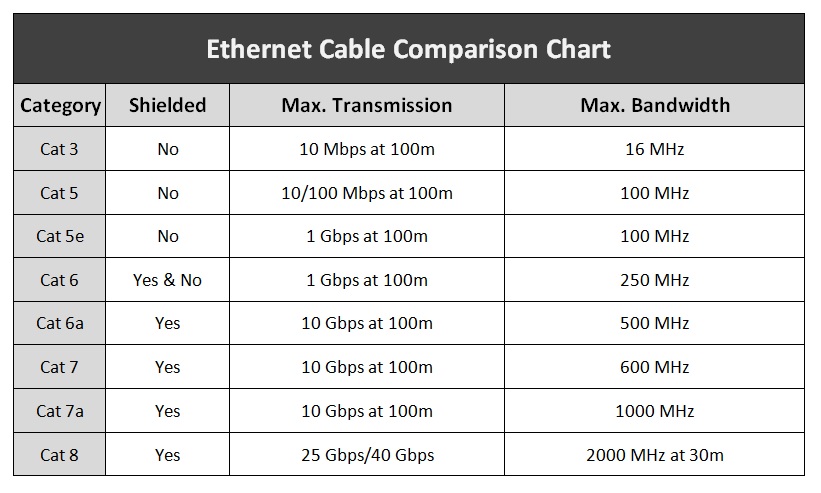
Ethernet Cable Wiring OntarioFor most homes, Cat 5e is all you need.  That is what I have in my walls and it works flawlessly.  The main reason for a home to step up to Cat 6 might be shielding to reduce radiated noise to other devices.  I personally don't think that's necessary, but if you are doing a fresh install and want to go for Cat 6a to future proof it, please go ahead, but note you won't be using that bandwidth any time soon.  There is no audio benefit at all to overbuilding your Ethernet cables. 

Ethernet transmission uses balanced, electrically isolated lines, but the shielding can actually create a ground loop.  Shielding is assumed to be between devices on the same rack, with similar ground potentials.  If you are running a long shielded Ethernet cable you should put an isolator on one end.  More below. 

Fiber

Optical fiber cable usually has a minimum of 10 Gbps capability but compared to 1 Gbps copper Ethernet, it has no audible bandwidth benefit at all.  As we showed above, 1 Gbps is more than enough for audio, and even multiple video streams.  That's not to say it has zero use in the home though. Here are some potential benefits: 

  • Completely immune to electrical surges
  • Immune to EMI/RFI contamination 
  • Completely immune to ground loops and different ground potentials (unlike shielded Ethernet)

The downside of fiber is that if you add a media converter you also add  another power supply with potential AC noise contamination.  

There are situations for which I absolutely recommend you use fiber: 

  1. Between a coax modem and your home router to isolate your home network from incoming electrical surges (i.e. lightning strikes)
  2. Distributing Internet access across buildings 
  3. Long internal runs (> 20m) which may pick up an EM pulse from lightning or other sources 

In my informed opinion, using Ethernet to Fiber conversion just before a streamer is not a win, but a tradeoff.  While you get electrical isolation, you add more power supplies and their potential pollution.  Instead what you should use is an Ethernet isolator rated for patient care areas like this one.   I'll discuss this more under Noise and Surges, below. 

Noise Reduction

Audible noise could come from one of three sources: 

  • Ethernet
  • USB 
  • AC Power 

We'll cover surge protection near the end.  

Ethernet

Ethernet signal pairs are transformer isolated by design, it has to be.  With a 50 meter run being normal it's quite likely to run into different ground potentials between one Ethernet device and another, so the spec automatically includes about 2 kV of isolation, but due to little caps being in the circuits we could still have an issue. 

I recommend a non-grounding Ethernet isolator rated for patient care equipment which add 4 kV of isolation.  I call it hospital grade because I can't imagine it being used anywhere else.  The audiophile versions may not be tested the same ways and are more than twice as expensive.  You may think 4 kV is excess, but actually one side-benefit is that recent studies have shown that Ethernet isolation is a better surge protection inside of buildings than protection which grounds a surge.   More below.


USB  

Ground loops through a USB connection are uncommon but real.  They can create measurable jitter and sometimes (like with my Mytek Brooklyn) actually audible hum.  The solution to this is to use a USB isolator.  USB 2.0 is enough for even high resolution DSD.  
 
Honestly it's a bit of a shame that this ever happens because USB isolation chips are super cheap, no streamer today (CE 2026) should need a USB isolator but consider them more important when going from a PC with a long cable run. 
 

AC Power Line

Audio equipment is always battling power line noise, and some do so better than others.  Small network devices like switches, media converters (i.e. Ethernet to fiber), Raspberry Pi or micro computers and streamers can both consume noise but also produce AC line noise which then pollutes other analog devices like your preamp or amplifier. Computer power supplies are especially large producers of noise. 

For the small wall adapters I highly recommend iFi adapters for having very low noise outputs and for not producing more noise on the incoming wire.  

If you use an expensive power conditioner such as Furman or Audioquest, remember to keep these noise polluters outside of your cleaned power.  Putting a PC power supply on the output of your Audioquest will make the outputs dirty.  Plug them in before your audiophile conditioner and perhaps on their own filtered power strip. 

If you must use a laptop or PC as your source, I encourage you to treat the original power supply as hostile and encourage you to consider an after-market linear supply.  If you aren't sure if it's worth it try listening to your system with the laptop on battery power alone, with the power supply unplugged from the AC outlet.  


Surge Protection 

Electrical surges can appear on Ethernet lines and while some are catastrophic, fire starting events 99% of them are invisible which may "only" affect the network connectivity of a device.   It only takes a little event to wipe out a laptop, TV or audio streamer, and a slightly larger event may travel to multiple connected devices.  For these reasons I encourage a multi-layer approach. 

Most residential network surges come from the outside coaxial line, but not all.  Damaging network surges can be induced from a nearby strike, especially on long Ethernet runs but also a power line surge which occurs in a remote part of the home can jump into the Ethernet, and attack anything else that is wired in your network. We'll cover each of these possibilities.  

I can't repeat this enough: Most equipment killing surges are not the catastrophic lightning strikes readers always bring up, and in fact most are invisible and most of those preventable.   Yes, if lightning blows a hole through your roof, a surge protector won't help you, but that's like saying a seat belt won't save  your life when a truck falls on your car from an overpass.   Well, it's true, a truck falling on your car from 30' feet high is lethal, but there's a whole range of other car accidents which are lethal only when not wearing a seat belt.  Having lived in thunderstorm prone areas of the south eastern United States for much of my life I've seen both, and I can tell you the survivable surge damage far outnumbers the catastrophic events. 

The other insane objection I hear to surge protection is that users unplug their devices when they know a storm is coming.  So two things: 

  • Do you always know when a storm is coming?  I have lived in coastal areas for a long time and I absolutely do not. 
  • Do you remember to unplug your network gear from the coax every time?  Do you want to?   


Outside

If your home is served by a coaxial cable which enters the outer perimeter I strongly encourage you to use a 90V gas discharge coaxial surge protector and mount it to your existing outdoor grounding block.  In fact you should use one for ANY incoming coaxial cables, whether it's Internet, satellite or FM antenna.   Your existing grounding block is NOT a surge protector.  It's just there  to ensure you don't have radically different ground potentials between your antenna and your indoor equipment.

Make sure to get the 90V versions.  Some come with 250V or higher discharge tubes.  Fortunately, the tubes themselves are replaceable. You may want to just routinely replace them every 5 years or so, or after any really bad event. 

I should point out they are not perfect, so you might still lose a device such as your modem on a heavy, fast surge, but what they will do is keep the majority of the surge current outside your home, and clamp the surge voltage so that you are unlikely to lose more than the first device. I treat my provider's modem as sacrificial in that sense.  

Some surge strips come with built in coaxial or Ethernet cable attachments.  These are notoriously bad for reception and often the first thing an installer removes when they get a service call.  I absolutely agree with that approach.  Avoid them.   


In Between

The one place in an audiophile's home where I really do recommend using fiber is in creating an electrical Demilitarized Zone (DMZ) between the modem which connects to the outside coax and your home Wifi router.  High end routers now have sockets for fiber, or USB WAN adapters which can be used with a fiber adapter.  The cheapest and easiest way is, of course, to use a pair of media converters with at least a one meter fiber adapter in between.  Just take care to order the correct fiber cable, as the choices seem complicated.  

Of course, if your home network is entirely Wifi based you have no such worries.  Wifi is unable to transmit an electrical surge of any kind, and if you have a good signal Wifi 5 and 6 are more than capable of keeping your streamer well fed.  Every smart phone, tablet and laptop has access to free Wifi analyzer software which I encourage you to use.  They will help you check your signal and also make sure you are using a clear channel.  Wifi in congested apartment buildings may be too noisy to use. 


Inside

The latest research on Ethernet surges suggests that Ethernet surge protectors which use a ground wire inside the home may actually encourage more damage than they protect from, and the worst ones convert common mode surges, which would have been benign, into damaging differential mode.  The alternative  is adding Ethernet isolators.  While not originally designed for surge protection their benefits are real.  

As we mentioned before, Ethernet DOES have inherent 2kV isolation.  We recommend for long runs the use of Ethernet isolators rated for patient care areas, which adds 4kV more.

We should note that there are Ethernet surge protectors designed specifically for outdoor devices, such as CCTV devices. These are the only units which SHOULD ground a surge, when they are located near the entrance and properly bonded to the home grounding system.  Similar idea to the coax protector on the ground block, above. 

We note that a differential surge can cross the boundary far below 2kV.  

Stream Jitter Reduction 

Right now this  is where the most expensive snake oil in all of audio resides.  The industry is made  possible because most audiophiles don't understand how audio or video streaming works, so we get $500 "audio grade" network switches, $300 Ethernet cables, and streamers sold as four separate devices and so on and so forth.  

The only devices which can possibly improve the reliability and reduce the jitter of an incoming stream are those with built-in, multi second buffering,  which any decent streamer should already include.  The Roon server is the only example of a third party device which could conceivably improve network jitter performance.  All the other Ethernet switches, isolators and regenerators are useless.  

The big technical issue most listeners don't understand is that streaming involves buffering of signals which are not intended to be real time.  Netflix, Amazon, Qobuz, etc. all keep a few seconds of buffer in memory, or try to anyway.  When you are driving in your car your music stream is fed from that buffer.  When you go through a short dead zone, the music keeps playing from that buffer and gets refilled when you reconnect.   That same technology MUST be used for audio and video streaming.  This means that even with high amounts of jitter, and some amount of packet loss the digital jitter in your audio stream is entirely the fault of the streamer and no upstream Ethernet reconstruction can improve on this. 

Roon is unique (and I'm not trying to sell you on it) in that there are two isolated streams.  One from your external provider and an entirely new stream via the RAAT protocol which arrives at your playback endpoint.  

We point out that there is such a thing as network jitter and it has no relationship whatsoever to jitter measured at a DAC's outputs.  When network errors or jitter are excessive you do of course have problems, but your streamer should handle them.  

Streams and the  Internet 

To quickly explain why only the end-point reconstruction matters, we have to understand how a stream is broken up, transmitted and reassembled.   Many non-technical audiophiles imagine a situation much like the old copper telephone line or an FM radio station.  That there's a playback machine at Qobuz or Tidal which starts playing music, and your DAC is just the passive receiver, and based on this theory you are hearing in real time what your streamer is sending you.  In fact, nothing is real time, and even on line video/phone calls are at some delay. 

Imagine a song is a kit home, with the home in pieces that could each just fit on the back of an SUV.  A song is broken down into those pieces, in order, and put onto individual SUV's.  Those delivery SUV's must now travel across the country, or across the world, along with a bazillion other SUV's and cars and motorcycles.  Traffic jams, accidents, detours and spontaneous changes in speed and traffic all affect when or if each SUV arrives at your device with it's payload intact.  The packets are all sent in order, but they may not arrive in order and in fact some may be lost.  On the building site the foreman must review each package, ensure it's integrity and place each part of the kit in the exactly correct order in the warehouse regardless of when each delivery SUV arrives.  Only that foreman communicates with the kit maker (Qobuz, Tidal, etc.) and knows what's arrived and what's missing.   The foreman's job is to stay several kits ahead of his workers.  That is, he asks for kit parts that his workers don't even need yet.  This way if a part fails to arrive he has time to request a duplicate.

Critically, the foreman doesn't play music, and could care less about the DAC clock.  That's his worker, the DAC.   All the foreman is looking at is the number of packets in the warehouse.  He checks the number of parts in the warehouse and when they run low he orders more. There's absolutely no need for him to pay attention to the super accurate clock in the DAC itself.  All he has to do is keep ahead of it as much as comfortable. 

As kit parts arrive, the foreman ensures that they are not placed on the warehouse floor until they are checked and in order.  The DAC worker pulls off one box at a time in the exactly correct sequence but only when they need it.  They are at the mercy of the DAC clock, and are oblivious to the foreman's woes.  The warehouse may be nearly empty, or full, the workers proceed at the same pace, one box per clock tick. Disruption occurs only when the warehouse fully empties and the workers stop and wait for more parts. Otherwise whether the parts arrived exactly on time and in exactly the right order, or were constantly faced with delays due to traffic jams and SUV's taking different routs, they simply don't care and don't notice. 

Fancy Ethernet reclockers, regenerators etc. are like putting an atomic clock on the traffic light outside your home.  Sure, you'll get extremely precise changes to the lights, but what does that matter to the metaphorical house we are building?  Not a bit.  Roon is different in that it's actually like putting a transfer station a couple of blocks from your home.  That transfer station has it's own foreman.  Your $10,000 USD audio grade switch does not, it's just a fancy traffic light. 

I'm not pushing you to use Roon but use it here as an example of technology which could credibly improve upon Ethernet before a streamer but this only happens because the Roon server owns the connection to Qobuz, Tidal, etc. and creates a second buffered stream via RAAT to the endpoint(s).  That ownership and reconstruction means it buffers, reassembles packets and requests retransmissions of missing data as well, and two foremen (i.e. buffer managers) are involved.  That's not something a very expensive but otherwise "dumb" Ethernet switch can do.  

Hopefully you've realized that this two part system means that the foreman is not clock locked to the DAC, at all.  His job is just to make sure the warehouse has more work than the DAC is ready for.  Within reason, high or low jitter upstream doesn't matter to the DAC.  Within reason, the foreman happily takes up to several seconds of lag or packet loss which the DAC simply never knows about.  

So long as you have taken reasonable care in preventing excess noise from entering your streamer, the entirety of the quality of the output will be based on the streamer's own buffering mechanisms.  There's nothing else to spend money on.  

If you are concerned with the quality of your streaming, save your money and invest in surge protection, isolation and good power supplies instead.   


Wednesday, July 15, 2026

The OREI eARC Adapters for Vintage Audio Gear

I recently solved a problem in reusing an Anthem AVM 50 home theater processor with modern 4k/8k video standards.  The solution I found was the OREI BK-927.  


 The basic problem is that modern TV's are great for streaming and video but use eARC for high resolution audio.  eARC stands for enhanced Audio Return Channel.  It's like HDMI audio, but it isn't in the sense that pre-ARC gear won't see (hear) the audio from this channel.  It has to do at least with the handshaking the TV expects to know if it can send audio and what kind of audio it can send.   

Your alternative of course is to use coax or optical S/PDIF from the television, with limited audio bandwidth.  

Netflix

There's weirdness in the Netflix decoding however if your receiver is DD but not DD+ capable.  Via the LG app, Netflix will not work.  Via the Roku app, Netflix works if you disable DD+ in the audio's custom settings.  

 I'm really unhappy with the documentation provided by OREI, and the product descriptions on Amazon.  There's another device which sounds like this one, by OREI which actually will not work without an already eARC enabled device in the chain.  Useless for those of us without an eARC receiver/processor already. 

In any event, if you are like me attempting to use a vintage receiver/procesor, here's the step-by-step instructions.  Pay attention as they are not what you would expect. 

1.  Connect your TV's eARC  ro the middle connection.  It's labelled "OUT" and "TV ARC"

2. Connect your processor/receiver to the plug labelled "OUT/AMP", on the right. 

3. If your receiver is 7.1 capable set the dip switches all off.  Otherwise if it's 5.1 set them as 0-0-1. 

4. Plug in the power adapter

5. Press the ARC button if the ARC light is off. 

6. Turn the TV and receiver/processor.  

Friday, January 30, 2026

EcoFlow Battery Based Generators

 I've lived with EcoFlow generators for over a year now and I have thoughts. 

For me the hardware has been reliable, the real big issue is the software.  If your internet goes out, and your app session expires there's no way to use your phone to control the device, or monitor it.  You are out of luck until you get near an Internet connection. 

This kind of behavior is almost acceptable for printers but for a generator seems ridiculous.  

Honestly this is kind of ridiculous.  Many of us buy these units exactly because we need them in an emergency when both power and Internet service can be completely out.  Where I live we suffered a 2-day internet outage across multiple carriers due to a fiber cut. 

To me, requiring the Internet at all for a potentially life supporting product like a generator is absolute nonsense.  In practical terms the generators work without the Internet, but one big feature at least on my units:

  • You cannot adjust the charging rate without the app

Why does this matter?  Imagine you have a vehicle inverter or gas generator which is 500W but your EcoFlow is set to charge at full speed, which is 1,800.   You are officially stuck with no way to charge the EcoFlow.  Attempting to charge them even for a short period will blow breakers. 

Compare this to a situation when you are safe at home and have an Internet connection.  You stop watching Netflix, go over to your EcoFlow app, sign in again, dial down the charging rate to 400 W or so and walk it outside to your gas generator. 

Of course, once you are aware of this you can prevent an issue by setting the charging rate ahead of time to something less than your maximum otherwise.  

I'm honestly not sure what the capability of other battery based generators is, but it is worth checking out how important an Internet connection is, and whether or not your app is going to work without it.  

Tuesday, January 20, 2026

Why Isolated Grounds Are Bad

A question on Audiogon about using completely independent ground for audio gear.  The question I was asked was: 

Can you explain to me why an isolated ground is prohibited by the electrical code?

To be clear, in this conversation the question was about an audiophile who used a grounding system which connected to a ground rod which was driven into the earth but never bonded to the house's electrical system.  This is correctly called an earth-only ground. 

Isolated Ground 

 What the National Electric Code (NEC) calls an "isolated ground" is when an insulated green wire runs from the service panel's ground to a receptacle with an isolated ground pin is perfectly legal and safe but not what we discuss below.  

An isolated ground outlet has a little green triangle on it, a feature  usually only found together with hospital grade outlets.  The isolation here means the ground pins in the receptacle and the strap across the back are not bonded together.  If this is used in a metal outlet the outlet must have some other means of grounding.  All totally safe when done correctly. 

Earth-Only Ground 

What we do want to talk about is why you can't just use an arbitrary new grounding system to replace the ground conductor in an outlet.  In other words, why is an earth-only ground expressly prohibited?

The answer boils down to "what is the ground conductor in a receptacle meant to do?"

A ground pin on a receptacle should provide a high quality connection back to the service panel where the ground is bonded to the house neutral.  This means low resistance.  The idea is that should a fault occur from the electricity flowing through your appliance to the outer chassis the ground should whisk that voltage away and cause a breaker trip.  

https://bpb-us-w2.wpmucdn.com/blogs.baylor.edu/dist/c/3127/files/2015/12/DQ-Screen-Shot-2015-12-04-at-4.10.29-PM-29wbxtz.png 

Audiophiles get very tunnel visioned when it comes to ground wires, never before thinking about them until they start chasing some real or imagined problem with their gear.  To these audiophiles it’s like "Aha!! Thomas Edison himself along with the American electro-industro-capitalist cabal are conspiring to keep me from my ideal sound!!"  And having realized this undeniable truth then set about to undermine it at every opportunity! 

So, back to reality and why it’s bad/not up to code.  The quick answer is that this earth-only grounding conductor won't function as intended.  It won’t trip the breaker during a fault and tripping the breaker and keeping the voltage off the chassis is exactly what it should do.

Without getting into math, just consider that the dirt around your home is a poor conductor, or at least, incredibly variable quality of conductor. If it were a good conductor we’d probably have speaker cables made of dirt, but I digress.   Point is, you can’t use the dirt  around your home as a guaranteed high quality, low resistance path back to your service entrance ground point.

The Washing Machine Example

A surprising number of people have been shocked at one point or another by a washing machine and lived to tell about it so we'll use one as an example. 

Imagine you have a washing machine, with a fault.  Meaning, the hot wire (black or red) is conducting to the outer metal case, the chassis, of the washer.  This is a type of short circuit.  The quality of this short can vary, sometimes it’s very slight and sometimes it’s lethal.  If it's really bad we call it a "hard" fault. 

If that washer's chassis is attached to an excellent conductor back to the ground at the service entrance then 100% of that current is conducted through it, and the voltage at the outer chassis must stay near 0.  Meaning when you touch it you touch the voltage at the ground.

If the fault is "hard" and the ground conductors are of high quality then this short to ground will also trip the breaker, exactly as intended.


Now lets imagine this same faulty washing machine relies on an earth-only ground.  In the diagram above we put in several hypothetical isolated ground rods to attach the washing machine's grounding conductor to.  As you move that new ground rod physically away from the house ground rod the voltage on the chassis rises, and the likelihood of the breaker tripping before you are shocked to death decreases.   Of course the worst case is you have infinite distance to ground with a lifted ground and the full AC voltage could appear at the metal case of the washer.  

Keep in mind that a typical home circuit breaker is 15 Amps, but 0.008 Amps in the right circumstances can be lethal.  A typical breaker won't trip before a lethal injury occurs.

Also, 15 Amps through a delicate audio signal carrying RCA connector can start a fire when it melts explosively.  This can happen if the RCA ground becomes energized and the appliance it is connected to is not properly grounded.  I’ve seen very similar situations described on Audiogon, smoking an expensive phono stage.  

To summarize, an earth-only ground is expressly forbidden by the NEC and for exceedingly good reasons.  I hope my explanation helps you understand the whys of that. As a lifelong audiophile I 100% agree with the NEC and encourage you to hire a qualified electrician if in doubt.  

If you absolutely cannot run a ground wire to your outlets, the NEC does allow you to use a GFCI outlet, properly labelled.  The issue with this is that it is to protect people, not equipment and therefore most surge protectors won't work properly.  

Supplementary Ground Rods

The NEC does allow for any number of ground rods to be added to your grounding electrode system so long as they are bonded together with at least 6 gauge copper wire.  
 
Important to note for hobbyists that running a 12 gauge wire from an outlet to a new outdoor grounding rod does not meet the requirements.  
 

Tuesday, January 6, 2026

Driver Nulls

 This is a simulation of my recently completed 3-way speakers with the midrange inverted. 


Friday, December 5, 2025

Equivalent Peak Dissipation Resistance for Dummies

I wrote a long article on EPDR, but realized I needed to simplify it for non technical readers. Here it is. 

SOA 

Amplifier output transistors have a safe operating area (SOA).  For power, temperature, current and voltage, these are values which must not be exceeded or else device failure will occur.  Many amplifiers incorporate circuitry to prevent this from happening.  

EPDR 

EPDR tells a speaker crossover designer how easily their speaker could exceed these values for linear amplifiers (A or A/B).  

Within the SOA of an amplifier however EPDR does not tell us how the speaker and amplifier will interact and alter the output sound.  

The speaker impedance however can be used to estimate where amplifiers may no longer produce balanced outputs and begin to "sag" due to excess current delivery. 

EPDR is not a better way to understand amplifier sag than the impedance curve.  In fact EPDR does not tell us anything about the voltage or current at the speaker terminals, so long as the SOA is not exceeded.  

Wednesday, December 3, 2025

Basics of Hard to Drive Speakers

Basics of Hard to drive Speakers

Basics of Hard to drive Speakers

Basics of Hard to Drive Speakers

While writing a blog on EPDR I realized I needed to explain what a hard to drive speaker was, and why EPDR does not really help you.

In the typical parlance of audiophiles, a hard to drive speaker is one with unusually low impedance and / or phase angles. The reason for this has to do with how voltage is divided between the amplifier’s output, and the speaker. Without using complex math, here’s the basic voltage divider formula. We’ll use R (resistance) instead of Z (impedance) to keep things simple. Let \(V_{out}\) be the amplifier’s attempted output and \(V_{spkr}\) be the voltage that actually makes it to the speaker terminals:

\[ V_{spkr} = V_{out} * \frac{R_{spkr}}{R_{amp} + R_{spkr}} \]

Consider with a very good amplifier the amplifier’s output impedance ( \(R_{amp}\) )is very low, so if \(R_{amp} = 0\) therefore \(V_{spkr} = V_{out}\) because the right side becomes equal to 1. This is ideal, and the electrical output remains constant regardless of frequency. However, as \(R_{amp}\) rises and/or \(R_{spkr}\) drops, \(V_{out}\) starts to go along with the impedance curve, which can be a roller coaster. This is why tube amps don’t do so well with electrostatic speakers and their 1 Ohm loads in the treble, or really any speaker with < 4 Ohm areas.

Here’s the fundamental problem with EPDR : None of the formulas involved address the amplifier’s output impedance, or peak current delivery or anything else related to the voltage and current at the speaker terminals. The value and derivation of EPDR is entirely about transistor heat. Howard never crosses the line to claim it isn’t about heat, but he also tries to use this understanding as another, better impedance measurement, and it can’t be. And this is where the confusion has come from. JOB’s point however that EPDR can help understand which speaker is more likely to cause an amplifier to clip is valid. How many times have you heard an amp actually disconnect due to overheating however?

Another thing to note is that an amplifier’s output impedance is the end result of the power supply, output stages and feedback design.

Damping Factor

Quickly, amplifiers rarely publish or measure output impedance, but instead publish “damping factor.” It’s calculation is \(DF = 8 / R_{amp}\)

So an amplifier with a DF of 100 has an output impedance of 0.08. Important to note that DF is usually reported in the bass but is often lower (higher R) in the treble.

Wednesday, November 26, 2025

Stereophile and Equivalent Peak Device Resistance

EPDR is Not What I thought

EPDR is Not What I thought

Author

Erik Squires

EPDR and Stereophile

This blog post is opinion, history and math. I started out as a champion of EPDR until I learned exactly what it means and how it works. The understanding in the layman audio community is that EPDR is a better way to understand how an amp may sag under normal operating conditions, and therefore alter its output, but the truth is it isn’t doing what you think it is. For more information on how hard-to-drive has been defined in the past, turn to my blog post here. However after doing the research from the original EPDR articles and the source papers from Eric Benjamin I’m convinced EPDR is being oversold and overused among us. As you’ll read, this author is very skeptical of the value of EPDR vs. how much it is used in the community and how it is interpreted. Hopefully whether you agree with me or not this paper will give you clarity from which to make up your own mind.

Conceptual Invention

In 2007 Keith Howard coined the concept of Equivalent Peak Dissipation Resistance in his article Heavy Load: How Loudspeakers Torture Amplifiers. The idea of EPDR is to help readers understand more about a speaker and how hard it is to drive. Howard writes:

But for a magazine audience, the principal interest in a loudspeaker’s load impedance lies in gaining some indication of its compatibility with a given amplifier.

The rest of the article needs very careful reading, because to many readers it sounds like he’s saying this is a better impedance measurement, but he never actually proves that. He weaves together a lot of charts, and even contradictory data from Otala:

That was left to others to check, and their results suggest that [sigh of relief] this is not a phenomenon with any practical relevance. That is what Dolby Labs’ Eric Benjamin found when he investigated the issue in 1994 (footnote 3). It’s what I found, too, when I unwittingly reprised some of Benjamin’s work in 2005 (footnote 4), albeit using a software-analysis approach rather than an oscilloscope. While in this context you can’t prove a negative—there is always the possibility that some pieces of music will contain just the waveform necessary for a particular speaker to demonstrate the Otala effect—the available evidence suggests that this probably occurs extremely rarely, if at all.

but then Howard turns the ship around, after saying this isn’t important:

No, the problem with conventional impedance measurements lies not in the measurement method itself but the way in which its results are presented.

He then goes on to use Benjamin’s work with a lot of graphs, but this part is key: He labels the charts as showing equivalent dissipation, or rather how much heat will a typical linear amplifier produce. This is not a measure of how a speaker’s output will vary but how hot the amplifier will get. The “D” in EPDR stands for dissipation. This means heat at the transistor on the amplifier.

In personal correspondence between this author and Jack Oclee-Brown (JOB) (November 24, 2025) he gives the single useful feature of EPDR:

This is the usefulness of EPDR because it tells you if one speaker is more likely to trigger Safe Operating Area protection (to clip) than another.

As a speaker designer, transforming Benjamin’s formulas into relative resistance makes it agnostic of the amplifier’s rated output power, so for JOB I can definitely see how it is useful while evaluating crossover alternatives.

Despite this being useful for a speaker designer, I want to make this point clear: EPDR is not telling us the same information about how hard to drive a speaker is vs. the raw impedance curve, and it does not tell us how the speaker will sound wiht amp A vs. amp B. It is only about how much heat the amplifier’s output devices will generate when driving that speaker, and why it may clip early. Of course, an amplifier that clips will distort and sound terrible, but that’s a different set of problems than the audiophile and speaker measurement community thinks it is. Speaking for ourselves, we thought EDPR would do a better job of explaining why some speakers sound different with different amps, but after reading the source material we now understand that is not the case. Specifically, when an amplifier “sags” or underperforms. Typically a hard to drive speaker may sound like there’s a depression in the midbass with some amps, pushing a buyer to purchase an amp with more current capbility, but EPDR does not explain this phenomenon at all, it can’t.

That is, until clipping or overheating occurs, EPDR has nothing to do with the voltage or current at the speaker terminals. It does not demonstrate additional distortion, or reduced output. The invention of EPDR appears to be showmanship, aided by a lot of pretty charts in the article, and Howard letting the casual reader come to conclusions he doesn’t actually state.

Finally, it’s important to understand that EPDR applies ONLY to linear amplifiers. It has no relevance to Class D or switching amplifiers, which are becoming more common in high-power audio applications. The entire foundation of EPDR is based on the thermal dissipation characteristics of linear amplifier output stages. This is very different from the traditional impedance metrics which matter to all amplifiers and interacts with their output impedance the same way.

Howard’s article is where the conceptual confusion starts, but the equations themselves have their own messy publication history, which is worth understanding before we talk about the math.

Messy History of the EPDR Formulas

Because neither Howard nor Stereophile ever published a formal derivation, the history of the formulas and an understanding of who is using which version come to us through a patchwork of message boards, private communication and reverse engineering. Jack Oclee-Brown (JOB) was nice enough to put together the timeline as he remembers it in a private message. I share the contents here with his permission:


  • 2007: Keith Howard comes up with EPDR and writes the Stereophile article. He derives Equation 1 but it’s not published. EPDR isn’t used by anyone for many years.
  • 2014: I [JOB] wanted to calculate EPDR and so I did my derivation and contacted Keith to confirm it matches his. It does in email correspondence. I didn’t publish, it’s not my invention and I just wanted to use it at KEF.
  • 2020 March: [Room EQ Wizard] adds EPDR calculation. JohnPM (author of REW) confirms Equation 1 is used but given the timing he can’t have used my pdf because it wasn’t public at this point
  • 2020 Aug: Stereophile start adding EPDR calculations to their reviews. There’s some interest on ASR about how to do the calc and I post my derivation just to be helpful.
  • 2021: VituixCAD adds EPDR.
  • 2025: user cjlan01 on www.diyaudio.com noticed that there’s a discrepancy between Stereophile’s published data and Equation 1 so contacts John Atkinson and finds out they’re using [the simplified version] instead. Why they did this I have no idea but Keith is not a regular writer for Stereophile and it sounds like Jim Austin came up with [the Excel] equation.

My guess is that VituixCAD uses Equation 1, it’s only Stereophile who are calculating it incorrectly I think.


Notes: I have slightly edited the exchange above for clarity and used “simplified version” to describe the Stereophile / Excel formula, below as well as added links where convenient for the reader. Also, I’ve confirmed that VituixCAD’s numbers are very close to the Howard formula, and also a little optimistic compared to the Stereophile / Excel formula.

The Formulas

With that timeline in mind, we can look at the two equations that are actually in use today: the simplified Stereophile/Excel form and the more exact Howard version.

EPDR for Stereophile / Excel

In a separate message JOB wrote to us and says:

Stereophile use Excel to calculate EPDR and use a simplified version of the formula I derived (I guess they thought that was “good enough” and certainly much easier to type into Excel).

If this is true then from cjlan01’s message the Stereophile formula is:

\[ V_{diss} = 1 + 4.2 * |\phi|/90 \] \[ EPDR = Z_{mag} / V_{diss} \] To be clear, this is a linear approximation, but Howard provides a precise answer.

EPDR by Howard

Again, we have no knowledge of Howard explicitly taking credit for any EPDR formula via an academic paper or web blog. What we believe Howard’s formula is comes to us from JOB. JOB reached out to Howard and published in his notes in a post at Audio Science Review. Looking at JOB’s PDF, Howard’s formula (Equation 1 as described in the exchange, above) slightly simplified is as follows:

\[ \text{EPDR} = \frac{|Z|}{4\, \bigl( 1 - \sin\!\left( \tfrac{5\pi}{6} + \tfrac{2}{3}|\phi| \right) \bigr) \sin\!\left( \tfrac{5\pi}{6} - \tfrac{1}{3}|\phi| \right) } \]

We’ve covered the history of the conceptual invention of EPDR and the two formulas we are aware of. This has prepared us to discuss the underlying theory from Eric Benjamin.

Eric Benjamin’s Foundation

The underlying principle of EPDR, as Howard notes, is a paper by Eric Benjamin: “Audio Power Amplifiers for Loudspeaker Loads,” JAES, Vol.42 No.9, September 1994. The paper is copyrighted and paywalled, but fortunately formulas cannot be copyrighted, so we can walk through Benjamin’s ideas. Benjamin doesn’t directly publish a formula for EPDR. That’s not actually his goal. Benjamin’s paper is about power dissipation across devices in Class B amplifiers. In other words, he wants to know how much a transistor will heat up by calculating the Watts dissipated based on the load impedance.

Safe Operating Area

The safe operating area (SOA) for a transistor has instant and average components. Exceeding the peak power for microseconds (Formula 4) can destroy a transistor, as can exceeding the average power (Formulas 6 and 7) for extended periods of time.

The point that I want my readers to understand is that Benjamin’s goal, and formulas are to calculate power dissipation in the output devices of an amplifier. He is not trying to create a new impedance measurement for speakers, and is definitely not saying “the speaker will sound different because of this.” If anything, this is about heat sinks, and cooling. Even if you barely understand formulas, the term on the left of all three formulas is \(P_{d}\), power across a device, meaning a transistor. Power across a device is power that must be dissipated or let off as heat.

Instant Power Dissipation

I don’t want to make light of Benjamin’s work, but the three Benjamin formulas (4, 6, 7) involved which Howard probably uses as a foundation would be relatively simple for an electrical engineer to derive. The real value of Benjamin’s paper is in forcing EEs to think outside of the box when designing the thermal/power envelope of linear amplifiers. We’ll start with the instantaneous device dissipation formula (4):

\[ P_{d}(\theta) = (V_{s} - V_{0} \sin \theta)\left(\frac{V_{0}}{|Z_{l}|} \sin(\theta + \phi) \right) \]

Where \(V_{s}\) is the supply voltage, \(V_{0}\) is the output voltage amplitude, \(Z_{l}\) is the load impedance, \(\phi\) is the load phase angle, and \(\theta\) is the instantaneous angle of the output waveform. It is this instantaneous value which appears to be the source for Howard’s formula.

Learning Exercise for Equivalent Resistance

This is not part of EPDR itself, but a simplified teaching example to help readers visualize how dissipation-based equivalence works. We want to illustrate the concept of an equivalent resistance without the calculus Howard and JOB went through. We call this Equivalent Average Dissipation Resistance. The idea here is to give the reader with basic circuit theory a conceptual leg to stand on.

Let’s be clear of the concept and goal. We want to know the value for a resistor that would dissipate the same average power as the complex load. In other words, what value of \(R_{eq}\) would dissipate the same power as our complex load \(Z_{l}\) with phase angle \(\phi\) ? For instance, if we had a complex load of 4 Ohms at -45 degrees, what value of resistor would dissipate the same average power as that load when driven by the same voltage source? The resistor by definition would have a phase angle of 0, and therefore must be lower than 4 Ohms.

The calculation requires a two-step process. First we calculate a token voltage which will yield a token value for power dissipated given the load, and phase angle. Given power and voltage we then calculate the resistance. I say token because for our case, we don’t actually care about actual device power (\(P_{d}\)), we care about what would be equivalent resistance. So whether we calculate in the range of 0 to 1 watt, or thousands of watts, it doesn’t matter because we’re not actually sizing heat sinks.

Average Power Dissipation

Benjamin integrates his instantaneous formula (4, above) over the input signal’s conduction angle to get average power dissipation (formula 6 and 7, below). The end results are two formulas for power dissipation based on phase angle of the load, one for phase angles less than 50 degrees (6), and one for phase angles greater than 50 degrees (7).

Formula 6 if \(|\phi| \leq 50^\circ\) then:

\[ P_{d} = \frac{2 V_{ss}^{2}}{\pi^{2} |Z| \cos\phi} \]

Formula 7 if \(|\phi| > 50^\circ\) then:

\[ P_{d} = \frac{V_{ss}^{2}}{2|Z_{mag}|} * \left(\frac{4}{\pi} - \cos(\phi) \right) \]

Equivalent Resistance for Average Power

Then we set this equal to the power dissipated by a resistive load:

\[ \text{EADR} = \frac{2V^{2}}{\pi^{2} * P_{d}} \]

For our use, the exact value for V doesn’t matter. Set it to 10 or any other positive constant for all your calculations. Below is the R code which expresses Benjamin’s two formulas and our own EPDR calculator. Hopefully they will help you translate to your language of choice or even a spreadsheet.

# Benjamin's device dissipation formula. 
# This is written for easier use with vectors in R 
dev_power <- function (Zmag, phase_deg, V=10) {
  phi <- abs(phase_deg) * pi / 180
  
  # Go ahead and calculate both formulas, 6 and 7
  P6 <- (2 * V^2) / (pi^2 * Zmag * cos(phi))
  P7 <- (V^2 / (2*Zmag)) * ((4/pi) - cos(phi))

  # Return either P6 or P7 based on phase angle
  ifelse(abs(phase_deg) < 50, P6, P7)
}

# Calculate EADR
eadr_from_dev_power <- function(Zmag, phase_deg, V=10) {
  # Calculate some sample power dissipation
  P <- dev_power(Zmag, phase_deg)
  
  # Now we calculate what resistor would give the equivalent as returned, above
  EADR <- 2 * V^2 / (pi^2 * P)
  return(EADR)
}

We hope this exercise has helped you understand the concept of equivalent resistance in this context, though we have no idea if anyone will ever use this in real life.

Conclusion

We’ve walked through the publicly available sources (and sometimes not so public) for how Equivalent Peak Dissipation Resistance came into existence. We’ve shown the original research was intended to help amplifier designers understand how much heat their output devices would generate when driving complex speaker loads. We’ve discussed how Howard’s article puts EPDR adjacent to impedance and phase angle charts, but never actually proves that EPDR is a better way to understand amplifier/speaker matching in terms of sound quality.

While we have shown why we believe Stereophile and Howard’s formulas differ, we have no evidence that any version of EPDR is a better way to examine amplifier/speaker matching than the old impedance and phase angle charts. None of the derivations or formulas have anything to do with how a speaker sounds, or how well an amplifier can drive a speaker. As far as we can tell EPDR and the formulas from which it is derived have nothing to do with voltage or current across a speaker input. At the very best, EPDR can help understand which speaker is more likely to cause an amplifier to enter protective shutdown due to activation of SOA circuits, if any.

In addition, if we were designing amplifiers I would want to know the power output (Benjamin formulas 4, 6 and 7) directly instead of an equivalent resistance, which is why the entire concept of equivalent resistance in this field seems of limited use.

To paraphrase JOB’s point: EPDR may give a speaker designer some idea of the kind of amplifier needed to drive a speaker at full output. Below that, at moderate listening levels and power outputs EPDR doesn’t really give a consumer very much.