You should read this article if you want engineering based solutions to potential problems in your streaming setup. I'll show you high value purchases to improve or protect your gear and also explain what doesn't matter.
I use Amazon affiliate links and will make a buck or so when you purchase items from them.
The Streamer
We will mention a number of ways to optimize your streamer's performance, but we should start by discussing the effects of the streamer itself. The noise elimination of the streamer's power supply and how well it manages to isolate itself from the network, USB and Internet can make a difference in how much other equipment can improve it's performance.
In a perfect world. your new streamer has excellent galvanic and power supply isolation and uses an audio buffer so large even significant network disruptions go unnoticed by you.
What I offer you in this article are some cost effective ways to improve the electrical and networking environment your streamer lives in, but the better your streamer is to begin with the less these options will help you and the less audio benefit you will perceive.
Potentially useful streaming optimization purchases fall into several categories:
- Bandwidth optimization
- Noise reduction
- Surge protection
- Jitter (not really a thing but we'll discuss)
Network re-clockers and network jitter reducers as well as "audiophile grade" network switches are, in general, nearly useless, or they should be. We'll discuss why that's not really a thing after we talk about what you should consider instead. Our discussion below is focused on optimization for the residential audiophile.
Bandwidth Optimization
- 192,000 samples per second per channel
- 24 bits per channel
- 2 channels per stereo pair
This all adds up to under 10 Megabits per second, or 0.010 Gigabits per second. Even with 20 year old switches and cables you had more than enough bandwidth for simultaneous video and audio streams. Netflix and Amazon currently recommend 25 Mbps as the bandwidth needed for high resolution movies as well. We borrow a chart from network-telecom.com below, but it's a table we can find from many sources:
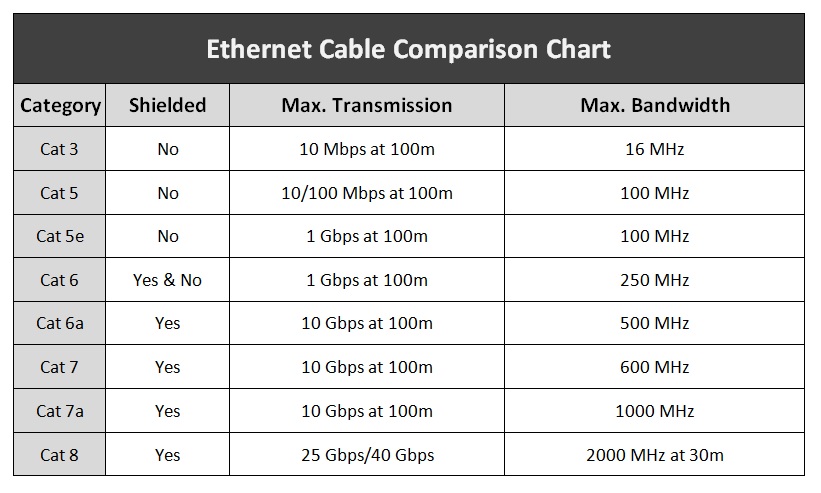 For most homes, Cat 5e is all you need. That is what I have in my walls and it works flawlessly. The main reason for a home to step up to Cat 6 might be shielding to reduce radiated noise to other devices. I personally don't think that's necessary, but if you are doing a fresh install and want to go for Cat 6a to future proof it, please go ahead, but note you won't be using that bandwidth any time soon. There is no audio benefit at all to overbuilding your Ethernet cables.
Ethernet transmission uses balanced, electrically isolated lines, but the shielding can actually create a ground loop. Shielding is assumed to be between devices on the same rack, with similar ground potentials. If you are running a long shielded Ethernet cable you should put an isolator on one end. More below.
Fiber
Optical fiber cable usually has a minimum of 10 Gbps capability but compared to 1 Gbps copper Ethernet, it has no audible bandwidth benefit at all. As we showed above, 1 Gbps is more than enough for audio, and even multiple video streams. That's not to say it has zero use in the home though. Here are some potential benefits:
- Completely immune to electrical surges
- Immune to EMI/RFI contamination
- Completely immune to ground loops and different ground potentials (unlike shielded Ethernet)
The downside of fiber is that if you add a media converter you also add another power supply with potential AC noise contamination.
There are situations for which I absolutely recommend you use fiber:
- Between a coax modem and your home router to isolate your home network from incoming electrical surges (i.e. lightning strikes)
- Distributing Internet access across buildings
- Long internal runs (> 20m) which may pick up an EM pulse from lightning or other sources
In my informed opinion, using Ethernet to Fiber conversion just before a streamer is not a win, but a tradeoff. While you get electrical isolation, you add more power supplies and their potential pollution. Instead what you should use is an Ethernet isolator rated for patient care areas like this one. I'll discuss this more under Noise and Surges, below.
Noise Reduction
Audible noise could come from one of three sources:
- Ethernet
- USB
- AC Power
We'll cover surge protection near the end.
Ethernet
Ethernet signal pairs are transformer isolated by design, it has to be. With a 50 meter run being normal it's quite likely to run into different ground potentials between one Ethernet device and another, so the spec automatically includes about 2 kV of isolation, but due to little caps being in the circuits we could still have an issue.
I recommend a non-grounding Ethernet isolator rated for patient care equipment which add 4 kV of isolation. I call it hospital grade because I can't imagine it being used anywhere else. The audiophile versions may not be tested the same ways and are more than twice as expensive. You may think 4 kV is excess, but actually one side-benefit is that recent studies have shown that Ethernet isolation is a better surge protection inside of buildings than protection which grounds a surge. More below.
USB
AC Power Line
Audio equipment is always battling power line noise, and some do so better than others. Small network devices like switches, media converters (i.e. Ethernet to fiber), Raspberry Pi or micro computers and streamers can both consume noise but also produce AC line noise which then pollutes other analog devices like your preamp or amplifier. Computer power supplies are especially large producers of noise.
For the small wall adapters I highly recommend iFi adapters for having very low noise outputs and for not producing more noise on the incoming wire.
If you use an expensive power conditioner such as Furman or Audioquest, remember to keep these noise polluters outside of your cleaned power. Putting a PC power supply on the output of your Audioquest will make the outputs dirty. Plug them in before your audiophile conditioner and perhaps on their own filtered power strip.
If you must use a laptop or PC as your source, I encourage you to treat the original power supply as hostile and encourage you to consider an after-market linear supply. If you aren't sure if it's worth it try listening to your system with the laptop on battery power alone, with the power supply unplugged from the AC outlet.
Surge Protection
Electrical surges can appear on Ethernet lines and while some are catastrophic, fire starting events 99% of them are invisible which may "only" affect the network connectivity of a device. It only takes a little event to wipe out a laptop, TV or audio streamer, and a slightly larger event may travel to multiple connected devices. For these reasons I encourage a multi-layer approach.
Most residential network surges come from the outside coaxial line, but not all. Damaging network surges can be induced from a nearby strike, especially on long Ethernet runs but also a power line surge which occurs in a remote part of the home can jump into the Ethernet, and attack anything else that is wired in your network. We'll cover each of these possibilities.
I can't repeat this enough: Most equipment killing surges are not the catastrophic lightning strikes readers always bring up, and in fact most are invisible and most of those preventable. Yes, if lightning blows a hole through your roof, a surge protector won't help you, but that's like saying a seat belt won't save your life when a truck falls on your car from an overpass. Well, it's true, a truck falling on your car from 30' feet high is lethal, but there's a whole range of other car accidents which are lethal only when not wearing a seat belt. Having lived in thunderstorm prone areas of the south eastern United States for much of my life I've seen both, and I can tell you the survivable surge damage far outnumbers the catastrophic events.
The other insane objection I hear to surge protection is that users unplug their devices when they know a storm is coming. So two things:
- Do you always know when a storm is coming? I have lived in coastal areas for a long time and I absolutely do not.
- Do you remember to unplug your network gear from the coax every time? Do you want to?
Outside
If your home is served by a coaxial cable which enters the outer perimeter I strongly encourage you to use a 90V gas discharge coaxial surge protector and mount it to your existing outdoor grounding block. In fact you should use one for ANY incoming coaxial cables, whether it's Internet, satellite or FM antenna. Your existing grounding block is NOT a surge protector. It's just there to ensure you don't have radically different ground potentials between your antenna and your indoor equipment.
Make sure to get the 90V versions. Some come with 250V or higher discharge tubes. Fortunately, the tubes themselves are replaceable. You may want to just routinely replace them every 5 years or so, or after any really bad event.
I should point out they are not perfect, so you might still lose a device such as your modem on a heavy, fast surge, but what they will do is keep the majority of the surge current outside your home, and clamp the surge voltage so that you are unlikely to lose more than the first device. I treat my provider's modem as sacrificial in that sense.
Some surge strips come with built in coaxial or Ethernet cable attachments. These are notoriously bad for reception and often the first thing an installer removes when they get a service call. I absolutely agree with that approach. Avoid them.
In Between
The one place in an audiophile's home where I really do recommend using fiber is in creating an electrical Demilitarized Zone (DMZ) between the modem which connects to the outside coax and your home Wifi router. High end routers now have sockets for fiber, or USB WAN adapters which can be used with a fiber adapter. The cheapest and easiest way is, of course, to use a pair of media converters with at least a one meter fiber adapter in between. Just take care to order the correct fiber cable, as the choices seem complicated.
Of course, if your home network is entirely Wifi based you have no such worries. Wifi is unable to transmit an electrical surge of any kind, and if you have a good signal Wifi 5 and 6 are more than capable of keeping your streamer well fed. Every smart phone, tablet and laptop has access to free Wifi analyzer software which I encourage you to use. They will help you check your signal and also make sure you are using a clear channel. Wifi in congested apartment buildings may be too noisy to use.
Inside
The latest research on Ethernet surges suggests that Ethernet surge protectors which use a ground wire inside the home may actually encourage more damage than they protect from, and the worst ones convert common mode surges, which would have been benign, into damaging differential mode. The alternative is adding Ethernet isolators. While not originally designed for surge protection their benefits are real.
As we mentioned before, Ethernet DOES have inherent 2kV isolation. We recommend for long runs the use of Ethernet isolators rated for patient care areas, which adds 4kV more.
We should note that there are Ethernet surge protectors designed specifically for outdoor devices, such as CCTV devices. These are the only units which SHOULD ground a surge, when they are located near the entrance and properly bonded to the home grounding system. Similar idea to the coax protector on the ground block, above.
We note that a differential surge can cross the boundary far below 2kV.
Stream Jitter Reduction
Right now this is where the most expensive snake oil in all of audio resides. The industry is made possible because most audiophiles don't understand how audio or video streaming works, so we get $500 "audio grade" network switches, $300 Ethernet cables, and streamers sold as four separate devices and so on and so forth.
The only devices which can possibly improve the reliability and reduce the jitter of an incoming stream are those with built-in, multi second buffering, which any decent streamer should already include. The Roon server is the only example of a third party device which could conceivably improve network jitter performance. All the other Ethernet switches, isolators and regenerators are useless.
The big technical issue most listeners don't understand is that streaming involves buffering of signals which are not intended to be real time. Netflix, Amazon, Qobuz, etc. all keep a few seconds of buffer in memory, or try to anyway. When you are driving in your car your music stream is fed from that buffer. When you go through a short dead zone, the music keeps playing from that buffer and gets refilled when you reconnect. That same technology MUST be used for audio and video streaming. This means that even with high amounts of jitter, and some amount of packet loss the digital jitter in your audio stream is entirely the fault of the streamer and no upstream Ethernet reconstruction can improve on this.
Roon is unique (and I'm not trying to sell you on it) in that there are two isolated streams. One from your external provider and an entirely new stream via the RAAT protocol which arrives at your playback endpoint.
We point out that there is such a thing as network jitter and it has no relationship whatsoever to jitter measured at a DAC's outputs. When network errors or jitter are excessive you do of course have problems, but your streamer should handle them.
Streams and the Internet
To quickly explain why only the end-point reconstruction matters, we have to understand how a stream is broken up, transmitted and reassembled. Many non-technical audiophiles imagine a situation much like the old copper telephone line or an FM radio station. That there's a playback machine at Qobuz or Tidal which starts playing music, and your DAC is just the passive receiver, and based on this theory you are hearing in real time what your streamer is sending you. In fact, nothing is real time, and even on line video/phone calls are at some delay.
Imagine a song is a kit home, with the home in pieces that could each just fit on the back of an SUV. A song is broken down into those pieces, in order, and put onto individual SUV's. Those delivery SUV's must now travel across the country, or across the world, along with a bazillion other SUV's and cars and motorcycles. Traffic jams, accidents, detours and spontaneous changes in speed and traffic all affect when or if each SUV arrives at your device with it's payload intact. The packets are all sent in order, but they may not arrive in order and in fact some may be lost. On the building site the foreman must review each package, ensure it's integrity and place each part of the kit in the exactly correct order in the warehouse regardless of when each delivery SUV arrives. Only that foreman communicates with the kit maker (Qobuz, Tidal, etc.) and knows what's arrived and what's missing. The foreman's job is to stay several kits ahead of his workers. That is, he asks for kit parts that his workers don't even need yet. This way if a part fails to arrive he has time to request a duplicate.
Critically, the foreman doesn't play music, and could care less about the DAC clock. That's his worker, the DAC. All the foreman is looking at is the number of packets in the warehouse. He checks the number of parts in the warehouse and when they run low he orders more. There's absolutely no need for him to pay attention to the super accurate clock in the DAC itself. All he has to do is keep ahead of it as much as comfortable.
As kit parts arrive, the foreman ensures that they are not placed on the warehouse floor until they are checked and in order. The DAC worker pulls off one box at a time in the exactly correct sequence but only when they need it. They are at the mercy of the DAC clock, and are oblivious to the foreman's woes. The warehouse may be nearly empty, or full, the workers proceed at the same pace, one box per clock tick. Disruption occurs only when the warehouse fully empties and the workers stop and wait for more parts. Otherwise whether the parts arrived exactly on time and in exactly the right order, or were constantly faced with delays due to traffic jams and SUV's taking different routs, they simply don't care and don't notice.
Fancy Ethernet reclockers, regenerators etc. are like putting an atomic clock on the traffic light outside your home. Sure, you'll get extremely precise changes to the lights, but what does that matter to the metaphorical house we are building? Not a bit. Roon is different in that it's actually like putting a transfer station a couple of blocks from your home. That transfer station has it's own foreman. Your $10,000 USD audio grade switch does not, it's just a fancy traffic light.
I'm not pushing you to use Roon but use it here as an example of technology which could credibly improve upon Ethernet before a streamer but this only happens because the Roon server owns the connection to Qobuz, Tidal, etc. and creates a second buffered stream via RAAT to the endpoint(s). That ownership and reconstruction means it buffers, reassembles packets and requests retransmissions of missing data as well, and two foremen (i.e. buffer managers) are involved. That's not something a very expensive but otherwise "dumb" Ethernet switch can do.
Hopefully you've realized that this two part system means that the foreman is not clock locked to the DAC, at all. His job is just to make sure the warehouse has more work than the DAC is ready for. Within reason, high or low jitter upstream doesn't matter to the DAC. Within reason, the foreman happily takes up to several seconds of lag or packet loss which the DAC simply never knows about.
So long as you have taken reasonable care in preventing excess noise from entering your streamer, the entirety of the quality of the output will be based on the streamer's own buffering mechanisms. There's nothing else to spend money on.
If you are concerned with the quality of your streaming, save your money and invest in surge protection, isolation and good power supplies instead.
