Friday, December 25, 2020

Fix TV Streaming and Networking - Ethernet or Wifi

Hello everyone, it has been a very long time since I have posted about fixing networking appliance issues.  The last post I can remember was about making a hole in your router so you could put heat sinks and a fan on it.  I thought those reliability problems were gone, but it seems I was mistaken. This post is about fixing your TV's networking and streaming issues, with additional specific advice for LG OLED TV owners.


Before we get into any hackery we'll deal with some basics truths:

  •  Ethernet (cable network) is always going to be more reliable than Wifi.  Not just for your TV side but for your router as well. Wifi routers DO overheat, and signals degrade. 
  • Wifi routers are usually not set up correctly.  In an apartment complex it's often hard to find an unused channel so you are competing with your neighbors for Wifi bandwidth, even so we have ways to help. 
  • It seems LG TV's networking can overheat no matter the type of networking, we have a solution for that too. 

Tip 1: Switch to Ethernet

This will always give you the most reliable signal, and reduce the chances of your router overheating, in large part due to the overhead of encryption. This is not a guaranteed solution though, but it's often the most frustration solving. 

Tip 2:Examine your WiFi Neighborhood

You can find Wifi analyzer programs for almost every type of device. PC, Mac, Android, iPhone.  If it has a WiFi connection you can probably find an equivalent tool. The goal is to get your home WiFi on an unused channel.Take your analyzer to your TV's location to see the quality of your WiFi signal from the TV's perspective.  For whatever reason, even in the 21st century, the auto-channel selection of most WiFi routers is useless. You need to pick your own channel and stick to it, even if it means channel hopping a couple of times a year. Routers all tend to go to the same channels, so they always get congested.
 
Let me show you an example from MS-Windows 10, WiFi Analyzer. The Analyze view shows all the channels available on the 5GHz band.  Each colored hump or hill below represents a router's wifi signal.  Mine is on the for right, labelled MiWiFi.  As you can see, my signal is all alone, no other routers overlap.  On the other hand, if you look at the channels on the left (36, 40, 44) they are all pretty congested. Channel 40 especially looks like it may have 4 or more routers competing for bandwidth.
 

This is a frustrating situation because the quality of your signal streaming will vary a lot based on how busy those users are right now, and has nothing to do with you. The solution of course is to go into your home router's admin page and change your router to use a signal that is as clear as possible. 

Typically the newest signal bands are the most clear.  That is, 5GHz tends to have more open channels than 2GHz, but this has changed as the older, single band routers have started to age out of the population.  It is however worth while to try this experiment on 2GHz as well, just in case. :) 

Of course, you want your signal to be as strong as possible. If you can't get a better signal than -60dBm and you can only do WiFi, try to orient your router and TV for the best reception. Remember that routers transmit horizontally and down. If you live in a 2 story home you probably want your router on the top floor. If you still can't get a decent signal at all because your home is too big consider a mesh router. They are fresh on the scene, but I hear great things about the TP-Link offering, which is less expensive and less expensive to expand than others:


Tip 3:  Cool Off Your Router

Too often the TV's get blamed for what is actually a router problem. Before you blame it, see if the real problem isn't your router.  When you next have a problem, reset it and put a fan of some sort onto it. Does this solve your problem?  Are you also having problems with other devices at the same time?

Streaming 4K television takes a lot of processing power, maybe 60-80% of this processing power is due to encryption.  The higher the level of encryption, the more power, the more likely to overheat. Sometimes the overheating issue creep up on you.  Doing a marathon watching of Star Trek : Discovery and when you hit season 2, bam, down it goes.  Since most routers also have USB connectors it may be useful to see my USB fan ideas, below.


Tip 4:  Cool Off Your LG

Honestly I shouldn't even have to say this, but the reality is that so many embedded CPU and WiFi products are woefully under-cooled. Even if you maintain your TV room at a comfortable 74 degrees at all times I have seen evidence of these televisions getting too hot, and after several hours being unable to connect to anything, even with Ethernet.  The solution is to shut the TV down, wait a minute, and start again.

To understand the following hacks we need to find out where the CPU and network controller chips live, and for that we can rely on Youtube channel Tips and Tricks which posted a disassembly video from which I captured this key frame, below.


There are three important landmarks here: 

  • The Ethernet jack (below the yellow jack)
  • USB connectors to the right of the Ethernet Jack
  • The big silver heat spreader, and black heat sink poking out inside of it. 

 The reason you need to know all of this is that you are probably going to want to take the next steps without actually taking the whole rear panel off. I recommend you attempt the following hacks in stages as the first one involves no tools.  

Hack 1: USB Fan

There are a lot of these, and you may need to experiment due to noise issues, but here's an idea I really like, a USB fan on a microphone like extender:  
 
 
You just plug it in, and point it in the general area of the heat spreader. It may take you several days of not having a problem before you can say everything is fixed. 


Hack 2: USB Fan + Ventilation

First, you are responsible for any damage you may cause if you attempt this.  If you are not familiar with using power tools to cut through thin plastic do not attempt this! If your power tools touch anything inside you can ruin your TV. This being America, you are free to ruin your TV if you want to, just don't come crying to me that you didn't know what you were getting into.
 
This is basically the same idea as the hack, above but use a hole saw or Dremel or just drill bits to ventilate the back panel directly over that heat spreader. You can see why I'm not suggesting this as your first step, right?? 

If you really want to do this, but really are afraid, follow the instructions on the video, above, to take the panel off, and drill the panel off the TV. The good news is that losing plastic dust inside your TV won't hurt anything, but accidentally drilling the printed circuit board sure can. If you use a drill I strongly encourage this approach. The heat spreader is a little sturdier than most components, so maybe try a very small drill bit to ensure you are in the right area before using a bigger bit. If you lay it out nicely it may even look like it was made that way.

Personally I'd attempt this with a Dremel abrasive wheel and friend to hold a vacuum hose while cutting.  


If you go this route, consider getting a fan with a speed control instead of the one listed above. You don't need a lot of air movement to substantially cool this beast down.  This little beauty here would work, but you'll have to figure out how to best attach it.

One last thing:  You don't need a huge amount of air here.  A couple of slots, or a few 3/8" holes should be enough with a fan.  

Tip 5: What about non-LG TV? 

The same principles apply.  Look for the Ethernet jack, then find the heat sinks or heat spreaders near it, and try to cool them off.  You may even be able to tell by putting your hand on the back panel and feeling for the warmest area.

Thursday, September 10, 2020

Aftermarket fans for Sapphire RX 580 GPU

The Sapphire Nitro 580 is pretty much getting to be end of life, as we are about 2 months away from the AMD 6000 release dates, but I decided to do some mods and learned quite a bit about the tools and software you'll need. Let me share the story.


Sapphire Nitro 580

In it's day this was a pretty inexpensive and solid card for 1080p gaming.  The card comes overclocked out of the factory at about 1.4 GHz vs. 1.3 GHz stock, and comes with the Sapphire Trix OC utility which will help you watch the entire card, including the fan speeds from one convenient point of view. Solid behaving software too.  Sapphire uses PWM controlled, easy to replace fans.  Takes 1 set screw for each fan, and you can pull the whole thing out.  They measure to
be 90mm each.  At maximum load this card pulls down about 180W, so you can imagine the heat it generates.  


In terms of noise and temps, the cards at full load were honestly pretty noisy.  I could just hear them with my headphones on.  The question is, can I do better??


The Contenders

 
The GPU fan specs are rated for 3,000 RPM so I decided to try to match this with Noctua NF-F12 heavy duty fans.  About $25 each.  I swear to god, Noctua is the only fan maker who has never caused me a problem.  Cooler Master, Corsair, Thermaltake, Gigabyte, I have had issues with every single vendor except Noctua.
Rather than use cable ties I'm using a neat little bracket from Maxmoral


Hard to see, but on the left is a bracket that slides into the back of your case, turning your two 120mm fans into one tidy assembly.

The Sapphire card uses a rare 5-pin PWM connector. Your average PWM splitter will be too large to fit, so you can order a neat little adapter from ModDIY which is in Hong Kong, or you can connect to an empty fan slot on your Motherboard.  Here is where things get tricky.  AFAIK the motherboards will only spin up fans based on onboard (i.e. CPU or MB sensor) temps. They don't look at GPU temps, unless you have this great software package, the Argus Monitor toolkit.  For $10 I highly recommend it.  Not only is it clean, it's effing reliable. Again, I'm so sick of fancy light/fan controls that are broken.  Argus is completely solid.   

OK, but why do you need this?  Argus will take control over ALL  your motherboard fans and allow you to select a temp source! That's right, now you can use the GPU, or hard disk or whatever temp you want to control your fans!  Please get it and register it, totally worthwhile.

I got impatient and used Argus, and it works fine, but I just got the cable, with the extra cost sleeving, and it looks great, and has the exact came connector as the Sapphire shroud. 5-Pin VGA PWM Mini PH Connector to Dual PWM 4-Pin Fan Cable Splitter

Even if you get the ModDIY cables, there's another good reason for Argus:  You can control your case fans based on the GPU temp.  In my case with an AIO CPU cooler, there's really not much for the case fans to do based on CPU temp, but by letting the GPU set the case fan speed via Argus I can really increase the air movement when gaming.

 
The Installation

Sapphire accomplishes their Nitro street cred by adding not just easy to replace and clean fans but a really beefy cooler.  Take a look.  By removing the shroud and placing the 120mm fans right next to it we'll accomplish nearly 100% surface area coverage.  That is, almost all of those cooling fins will have air pushed onto it. Installation in this case was super simple.  Remove the 5 screws on the back holding the shroud, unplug the LED and fan connectors and bam, you are left with the naked radiator.


This brings me to another subject:  What about 140mm fans?  Honestly not needed, but the increased dead space at the hub the fan becomes an issue.  With 120 being near ideal coverage, 140s would waste space in the center and edges. Based on my testing, if you decide to get other fans, make sure they will do at least 2,000 RPM, this will let you hit the sweet spot of 1,500 to 1,800 without stressing them.  I'd caution  you against 1,700 RPM fans, you'll be using them at their max often.


Above you can see how tight the fans are to the GPU without any need for additional cable ties.


The Results
The success or failure of this project is in the fan speed tweaking.  At full GPU load if you are comfortable with hovering around 65 degrees you can set the fan speeds to go from 40-50% at 60 to 70 degrees. This is quiet.  Not dead quiet, but very quiet and with headphones unnoticeable. If you want quieter you can trade a little more heat for a little less fan speed.

A nice side-benefit of this project is that the graphics card fans no longer just cool the card but the motherboard mounted M.2 storage cards as well.  I use two Samsung 970 drives.  One is directly underneath the GPU radiator and the other between the PSU and the fan array.  I put  inexpensive heat sinks on my M.2 and they idle at about 30 degrees.  With the GPU temp rising the drive directly underneath the radiator would idle significantly hotter, around 45 or more.  Now it stays pretty frosty even when game playing. If you run your drives and your GPU hot, this is a huge win.


Friday, June 12, 2020

ZeroSurge - The Unexpected Interview

ZeroSurge

[Note: This post is a follow up to an earlier post ]

I'm happy to report that I was able to have a short telephone chat with Jim Manadeo of ZeroSurge.

He wasn't expecting to be interviewed, and I was not taking notes but I came away with it with some important and interesting tidbits.  I've been a fan of series mode surge protection for a very long time and this is the first time I had person to person contact with an industry insider.

Here's the important parts:

  • The only current licensee is SurgeX.  I confirmed that Furman was not a licensee.
  • Non-licensees who appropriate the technology use iron core inductors which are cheaper, and saturate faster.
  • Their biggest markets include the military and Wendy's restaurants.
  • My impression is they are not really that interested in the audiophile market, subject to change, of course. They love customers, this just isn't where they try to sell to.
From a technology point of view, Jim pointed out that these usurpers probably do not incorporate all of the circuit innovations, and they use an iron core inductor instead of air core, and this can lead to premature saturation of the magnetic field, reducing surge and noise performance.

SurgeX
Unfortunately, while SurgeX is a licensee the brand seems to have gone through some turmoil.  I won't write about their troubles here because I wasn't taking notes and I can't verify what I heard.  The SurgeX brand has been popular among HT installers and pro musicians but unfortunately I can no longer find a SurgeX web site and it's possible that the products that are at retailers are the only one's left. If you are an official rep, reach out to me for correction.

Purchasing
You can buy SurgeX and ZeroSurge products via Amazon via this (sponsored) link.


Sunday, April 26, 2020

How to Not Buy a Subwoofer

(Subtitle: Everything you really should have asked first but didn't because you thought this was going to be simple)

Update January 2021: 

This article is very theoretical.  If you want a practical, step by step take on how and why I avoided using a subwoofer for music please read here.

Introduction

Getting great bass in a room is one of the greatest challenges audiophiles will face. While interacting with a lot of audiophiles it is clear to me that getting great bass is important and, of course, the discussion of a subwoofer often comes up, but lets be honest, no audiophile wants to buy a subwoofer. We don't want to go, pay thousands of dollars and bring home more large boxes to take up more room in our home. The end goal is actually to have great bass and the expense, shipping and placement of a subwoofer is a means to that end.

The point of this article is to introduce several topics related to listening to a system great bass which you should consider, especially if your first and only thought to getting great bass in your room has been to buy a subwoofer. This post will hopefully be a survey of solutions before we get to subwoofers, and we do in fact discuss buying at the end.

VTF-15H MK2 Subwoofer
HSU Research VTF-15H MK II
At some point we will often consider getting a sub-woofer for one of these reasons:

  1. Small speaker with limited bass output 
  2. They need more bass despite having a floor standing speaker
  3. They've heard that a sub-woofer can really enhance the rest of the audio range
It is true that all of these items will be improved with a well integrated and well performing sub woofer but getting to "well integrated" is be fraught with complications, not to mention the cost and size of a sub.  Truthfully, very few audiophiles with a sub woofer know how to properly set up a sub, and most tire of trying before they are done, with mediocre results.

Don't get me wrong, I love subwoofers but a subwoofer is a glorious addition to a system only when it is properly set up because otherwise it is a nightmare.  In summary:

Without automatic room correction like Dirac or ARC the proper installation of a subwoofer is much more difficult and time consuming than buying it and putting in a corner. It is very easy for the average consumer to get this wrong.

Because subs are complicated it is worthwhile to explore alternatives which I list below and along the way we'll talk about room acoustics which greatly enhance a sub's performance.

Speaker Placement

The closer a speaker is to walls the more bass you'll hear out of them. Usually manufacturers recommend a specific distance away from the rear wall, but remember that side walls count as well. The legendary Allison speakers were designed to be up against the rear wall, and some Snells also rely on very close placement.  Of course, with closer wall placement you also have more early reflections, so your ideal combination might be closer to the wall, and more mid/treble absorption on the floor and walls. 

Tone Controls

There's no such thing as a neutral system when it comes to music playback. Unfortunately the best we can do is try to bowl down the middle of the lane and hope we get a strike more often than not.  Every recording and every mastering engineer was listening to a system very different than yours, and these systems, even if we could buy one exactly to match have changed over time. It is no lie that during the 70's and 80's single driver boom boxes were the standard often recorded to. 

Lets be clear:  A subwoofer IS a tone control.  If you are trying to use a sub to maintain some sort of religious purity, you've already lost, so just accept we are all sinners in the eyes of whatever audiophile purist church is out there and go all in, you will feel better, get to your happy place and spend less money.  There are generally two types of tone controls.

Dial Tone Controls
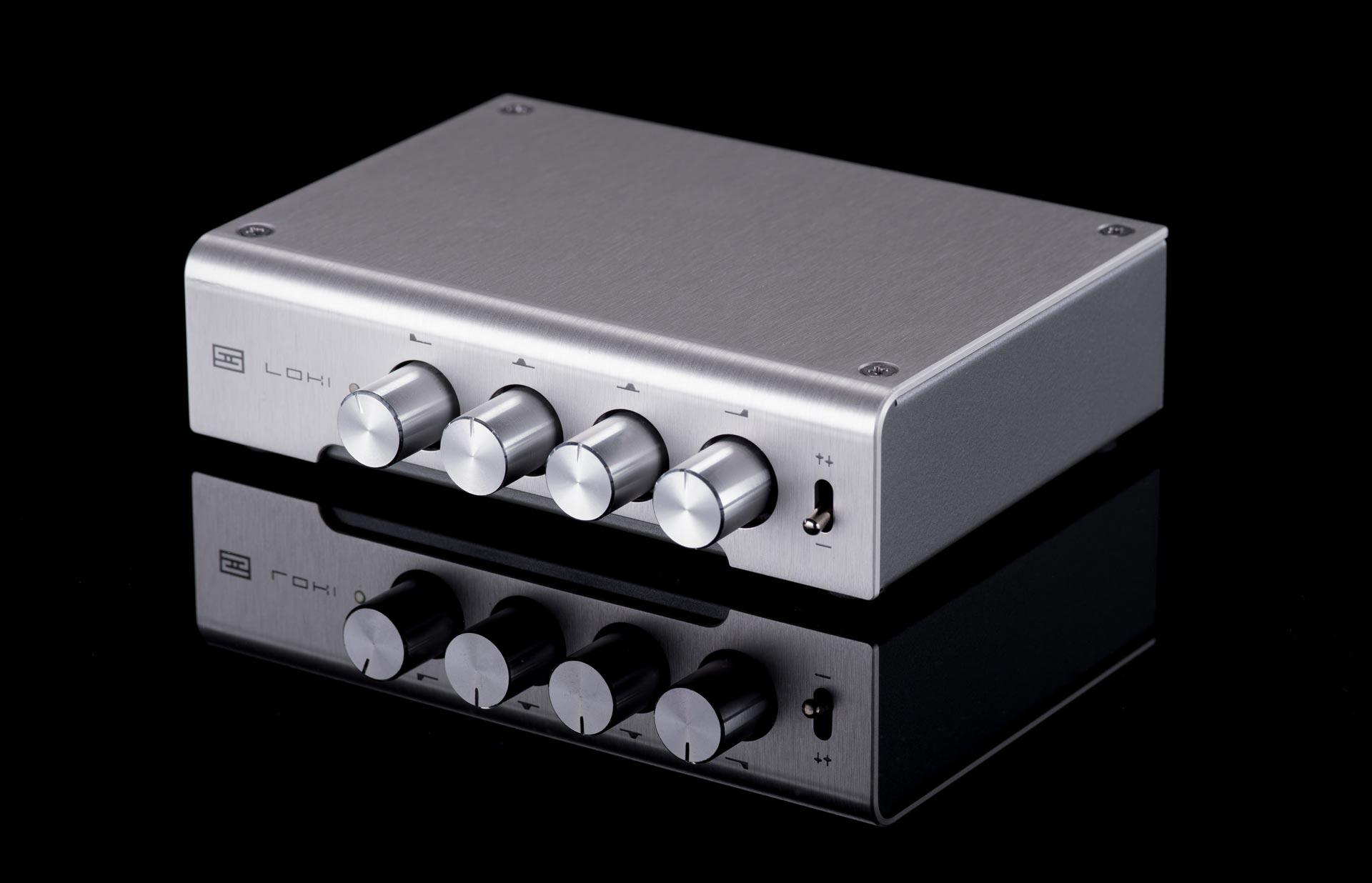
Schiit Loki

The point is that tone controls that sound good exist and are built into preamps integrateds and receivers or you can add a Schiit Loki which gets great buzz. Not all gear has great sounding tone controls, but even if they add some haze, the benefit of hearing a cymbal sing correctly or adjusting for aging hearing easily outweighs any haze.


Digital Tone Controls

These are now quite common either with room correction, outboard units like miniDSP as well as built into streaming software like Roon. They can be quite effective but require different levels of measurement and configuration. The big benefit here is precision. You can treat a narrow bass mode with a DSP in a way you can't get any other way. Even if you do buy a subwoofer, you should seriously consider an EQ somewhere in your chain, as the lower you go, the more room modes you will activate and having an EQ to clips them greatly enhances the performance.

To give you an idea of how these manual type of DSP equalization processes can work please see my previous post. It uses Roon as an example, but the principles of measurement and parametric filters are the same.


Automatic Room Correction

Automatic room correction can also be called "automatic sub integraters."  In addition to the automatic setup of parametric equalizers they will automatically configure the most important and difficult settings a subwoofer needs to sound good if not excellent.  Brands like the Anthem STR line, Lyngdorf, Dirac, Audyssey etc. are all making room correction mainstream, not to mention home theater processors. The ease of use of room correction systems is not to be underestimated.

One bit of advice: room correction systems have different goals which have been chosen by humans so they results won't sound the same.  You may really not like the choices one system makes vs. another so it is worth listening to them ahead of time.

Personally I like Dirac and JL Audio (subwoofer only) and Anthem, but I have not heard every system. Please audition and compare for yourself.


Amplifier
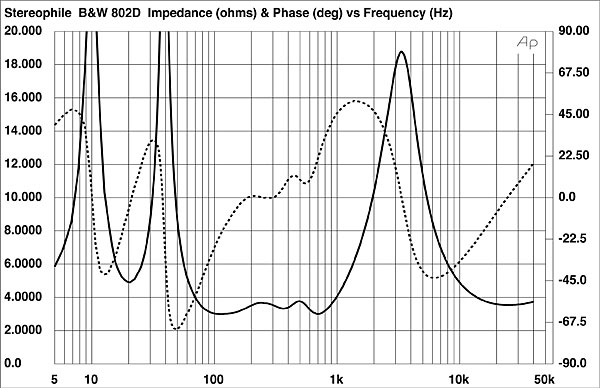
https://www.stereophile.com/images/616BW802fig1.jpg
B&W 802 D3 Impedance Curve
I don't want to spend too much time on this, since it is a very expensive proposition, and the amount a  new amp can benefit the bass output of a system is just more than trivial.  Noticeable but not a major difference. In my humble experience, amplifiers are more susceptible to low speaker impedance ( < 4 Ohms) than the math leads us to believe. A dip in impedance in the 80-300 Hz range often occurs with speakers and some amps are going to be more susceptible to this than others. This B&W 802 chart from Stereophile is a great example of a tough speaker between around 100Hz to 1 kHz.

When auditioning amps, you want to look at a chart like this and see if you hear significant differences in the low impedance range, as well as whether or not you like the change. You might actually like a less beefy amp as it may give you a built-in loudness curve with this speaker.  That is, there's no right answer. A megawatt amp may not sound right or be appropriate for you, but if you feel you need more bass, in the region the speaker dips this could be a reason why.

Remember when listening for this to listen at your normal listening levels. If you normally are working in the office listening from a distance, listen at that level. Don't try to judge this feature based on maximum output. 

Room Treatment

The right room treatment can make 2-way speakers sound huge and eliminate the desire for a sub altogether. Even if you treat the room and still want a sub-woofer, you'll find the improvements in clarity, smoothness transparency and imaging completely worthwhile.  To many audiophiles, the amount of improvement in bass performance room treatment brings to the table be shocking when first heard.

Treatments come in two flavors, so lets talk about them separately. I want to emphasize, as a committed apartment dweller, you can get treatment that work great in an apartment. Mine have outlived every other piece of gear I own. 


Listening Room Acoustics
GIK Acoustics

Panels

Panels on the walls and ceiling are a combination of diffusion and absorption that are mainly effective in the mid to treble range.  But wait, you are trying to fix a bass problem right? Well, what if the problem is not too little bass, but too much midrange or treble?  A live room will sound much brighter.  Reduce that and, like magic, the bass appears like a Spanish galleon emerging from the ocean at low tide.

If you are willing to spend thousands of dollars and countless hours buying a new sub or new speakers and setting them up, I highly encourage you to treat the room as best you can first. The best most cost effective way I know of right now is to ask GIK Acoustics for advice. Their panels are very effective and far below the cost of millionaire installer equipment from other brands. 

Bass Traps

Also available from sources like GIK, bass absorb bass but more importantly de-energize room modes, which not only makes speakers sound better but if you use an EQ either via Roon, miniDSP or via room correction systems the bass traps will greatly enhance their efficacy and even allow you to treat nulls which an EQ alone could not.

I don't know why but GIK doesn't promote their soffit traps very much, I find them ideal for an apartment as I can stack 2 of them in a corner and they work really well. 

But I Still Want a Subwoofer!

That's fine, get one. I own a Hsu VTF-15 which I use with six panels, two bass traps and a miniDSP unit and it's amazing, but if you get a sub treat the room first anyway. It will help the sub perform better and you'll have lots of other audiophile benefits.  Next, consider the setup effort. A subwoofer has to integrate with your main speakers as well as the room.  This means the following settings must be configured:

  • The crossover points 
  • Delay / phase 
  • Exaggerated room modes must be clipped via EQ
  •  If you have room treatment, or other null eliminating items like open layouts you may be able to fill in nulls as well.
So, before you buy, ask yourself how you will do this. Dirac and other room-correction systems will do this all automatically as will some new subwoofers. If you have time and desire to learn to do this manually, I suggest you search the Room EQ Wizard forums since it is a popular tool used to configure DSP equalizers. I don't use it so please don't ask me for help, I use OmniMic and am very happy with it.  Neither of these is a push button subwoofer configuration tool though.

For another take on this subject you might want to look at this article: 


What About Two Subwoofers?

This is a great idea, especially in larger listening rooms if you can place them optimally they can cancel out room modes.  Note that optimal placement takes time and effort and it usually means asymmetrical locations.

What About small Subwoofers?


The myth is that subwoofers with small diameter's are "faster." This is a myth.  Large diameters, powerful motor structures and big amps are what you want for bass, but!! Small subwoofers may excite the lowest room modes less due to their limited bass output. In this sense, for many listeners small subwoofers may sound better and be easier to integrate into a room.

So, yes, the idea of using a small subwoofer in a room is something to consider if you don't have enough room treatment, EQ, placement options, but it is still technically a myth that the drivers are faster or lower distortion. 

What about the Distributed Bass Array

To oversimplify, the DBA or  Audio Kinesis Swarm uses four subwoofers to cancel room modes. Please read details directly from the vendor as I am not a fan and therefore won't do it justice.

While I was a fan of this idea due to the innovation and possibilities it offered I never really warmed to it due to the physical complexity.  For me, I want my system simpler, smaller, and tripling the number of speakers in my home has no appeal at all. I am no longer a fan of this idea due to the fan boys and how cultish they have become. 

While the vendor's promotion online has been fair and honest the fan boys of this system are out of control.  From reading their posts and their attacks of the ideas posted above it is clear to me the fan boys have never heard a well integrated single sub so their opinion of any other ideas is at least misinformed if not down right deceptive.  At least one account seems to have been created specifically to show up and misquote Floyd Toole's writing to me.  You will notice the DBA cult because of the insistence that the DBA and only the DBA can solve all things bass in a room. This is how cults work.  They say "you have a problem (maybe you did not know you had this problem) and only our idea/savior/politician can save you."

Summary

  • Treat the room if you can and only when done there look around and see if you want a sub
  • Consider tone controls and equalizers as cost effective alternatives, even if you can't treat the room.
  • Consider the amp/speaker combination, but beware the cost and limited improvements possible.
  • If you still want to get a subwoofer, look at the alternatives and consider the integration effort as more important than the "quality" of a subwoofer.  How exactly are you going to be done setting it up? What good is a megabuck sub if you are only going to set it up half-way?
  • If the DBA seems like the easiest and most convenient way for you go and you have the space for it go ahead. 

Financial Disclaimer

Before anyone asks I have no financial interests in anything related to audio equipment or acoustics.  Whether you buy the brands I suggest above or find better one's I have no financial personal interest, direct or indirect.

Saturday, April 11, 2020

IM Distortion, Speakers and the Death of Science

One topic that often comes up is perception vs. measurements.

"If you can't measure it with common, existing measurements it isn't real."

This idea is and always will be flawed. Mind you, maybe what you perceive is not worth $1, but this is not how science works. I'm reminded of how many doctors and scientists fought against modernizing polio interventions, and how only recently did the treatment for stomach ulcers change radically due to the curiosity of a pair of forensic scientists.

Perception precedes measurement.  In between perception and measurement is (always) transference to visual data.  Lets take an example.

You are working on phone technology shortly after Bell invents the telephone. You hear one type of transducer sounds better than another.  Why is that?  Well, you have to figure out some way to see it (literally), via a scope, a charting pen, something that tells you in an objective way why they are different, that allows you to set a standard or goal and move towards it.

This person probably did not set out to measure all possible things. Maybe the first thing they decide to measure is distortion, or perhaps frequency response. After visualizing the raw data the scientist then has to decide what the units are, and how to express differences. Lets say it is distortion. In theory, there could have been a lot of different ways to measure distortion.  Such as Vrms - Vrms (expected) /Hz. Depending on the engineer's need at the time, that might have been a perfectly valid way to measure the output.

But here's the issue. This may work for this engineer solving this time, and we may even add it to the cannon of common measurements, but we are by no means done.

So, when exactly are we done?? At 1? 2? 5?  30?  The answer is we are not.  There are several common measurements for speakers for instance which I believe should be done more by reviewers:

- Compression
- Intermodulation ( IM ) Distortion
- Distortion

and yet, we do not. IM distortion is kind of interesting because I had heard about it before from M&K's literature, but it reappeared for me in the blog of Roger Russel ( http://www.roger-russell.com ) formerly from McIntosh. I can't find the blog post, but apparently they used IM distortion measurements to compare the audibility of woofer changes quite successfully.

Here's a great example of a new measurement being used and attributed to a sonic characteristic. Imagine the before and after.  Before using IM, maybe only distortion would have been used. They were of course measuring impedance and frequency response, and simple harmonic distortion, but Roger and his partner could hear something different not expressed in these measurements, so, they invent the use of it here. That invention is, in my mind, actual audio science.

The opposite of science would have been to say "frequency, impedance, and distortion" are the 3 characteristics which are audible, forever. Nelson pass working with the distortion profile, comparing the audible results and saying "this is an important feature" is also science. He's throwing out the normal distortion ratings and creating a whole new set of target behavior based on his experiments.  Given the market acceptance of his very expensive products I'd say he's been damn good at this.

What is my point to all of this?  Measurements in the consumer literature have become complacent. We've become far too willing to accept the limits of measurements from the 1980's and fail to develop new standard ways of testing. As a result of this we have devolved into camps who say that 1980's measures are all we need, those who eschew measurements and very little being done to show us new ways of looking at complex behaviors. Some areas where I believe measurements should be improved:

  • The effects of vibration on ss equipment
  • Capacitor technology
  • Interaction of linear amps with cables and speaker impedance.

We have become far too happy with this stale condition, and, for the consumers, science is dead.